

Agents
One row per governed agent, with the facts an audit starts from: who owns it, what state it is in, whether it has a spend ceiling, and when it was last seen.
The inventory is the only register of agents: there is no second list elsewhere that could drift out of sync with it.
The lifecycle
An agent is in exactly one of four states:
| State | Meaning |
|---|---|
| registered | Governed and listed, but it has never called. Its identity and credential exist; nothing has authenticated with them yet. |
| active | It has made at least one governed call. The first call flips it automatically; there is no separate "activate" step to forget. |
| paused | Its calls are refused. Either someone paused it, or guardrail auto-pause did when findings crossed the threshold. |
| retired | Permanently out of service, kept for the record rather than deleted, so its history stays intact. |
Register an agent
Registration is a dialog on the inventory. It only asks for what's needed to put the agent on the governed path: everything else, including its spend ceiling, is configured afterward.
Open Register on the inventory
Opens the dialog. Nothing outside the fields below is asked here.
Name the agent
e.g.
invoice-classifier. Shown on every inventory row and audit entry.Assign an owner (required)
The person accountable for it: the one who gets asked about it. The inventory's value collapses without this filled in.
Choose the model (required)
The model the agent runs on by default. Registration does not automatically restrict the credential to it. Unless you explicitly set an allowlist, an agent's credential can call any catalog model, the same unrestricted-by-default rule every key in Forgebench follows. To actually lock the credential to this model, pass
allowed_modelsexplicitly when registering via the API; the Register dialog doesn't expose that field yet, so this step alone doesn't do it. Change the default model later from the agent's own page.Describe what it does
Optional, but it's the strongest signal the tool-suggestion pass has to work from, and what a colleague reads in six months when deciding whether this agent can be turned off. Write it for them.
Add feature tags
Optional, comma-separated (e.g.
checkout, invoicing, pii-sensitive). Spend, refusals and findings roll up by feature, not only by agent.Register & issue credential
Mints the agent's identity and its one credential, shown once; copy it before closing the dialog, it can't be recovered. The agent appears in the inventory as registered, with no tool access at all yet; its first governed call flips it to active on its own.
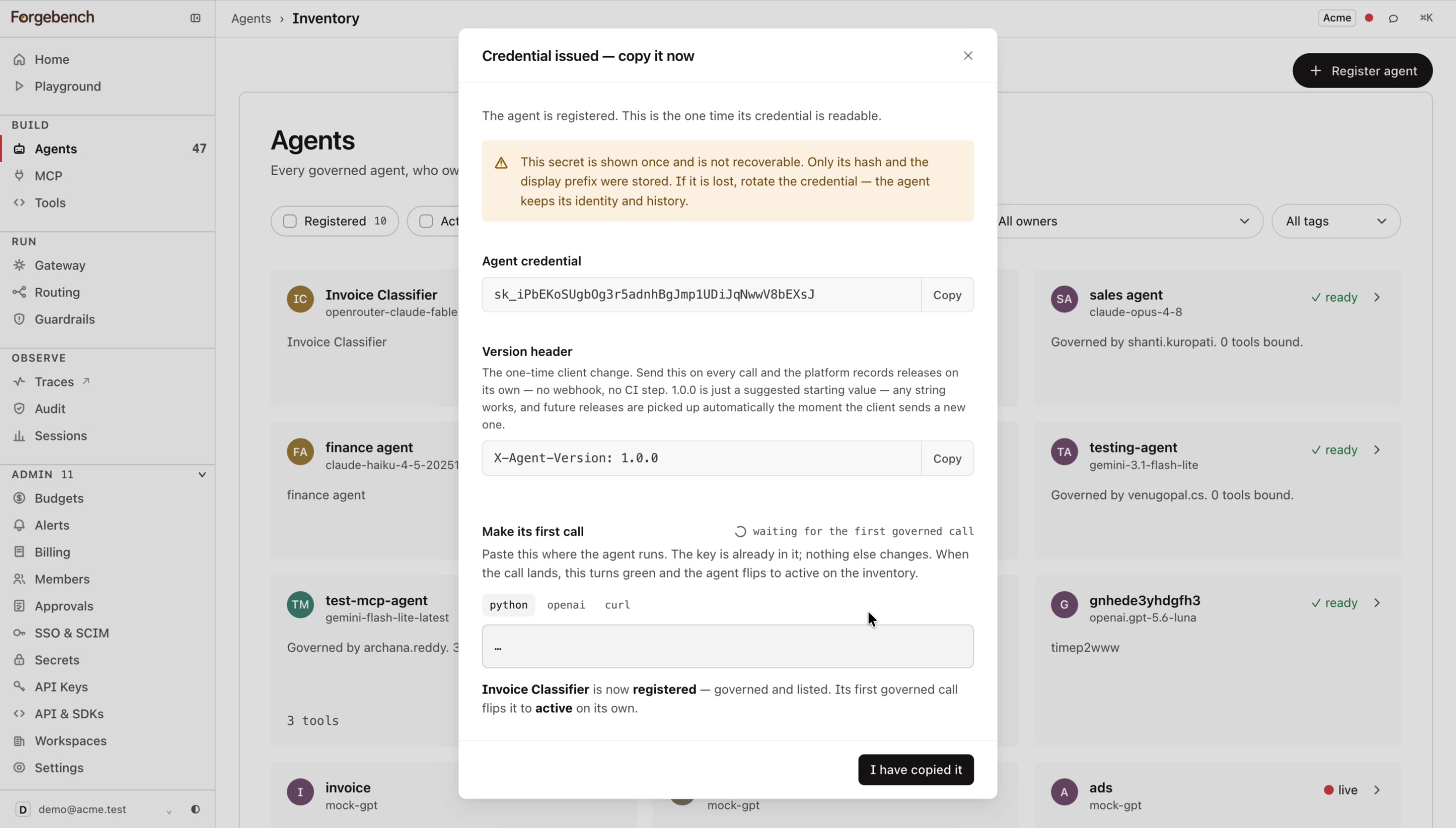
Alongside the credential, this screen gives you a ready-to-copy call in curl,
Python, or the OpenAI SDK shape, with the key already in it, and a live
indicator that flips the moment the agent's first governed call lands. It
also carries the X-Agent-Version header to send with every call: any
string works, and a new value is picked up automatically the moment the
client sends it, with no separate release step.
Set its spend ceiling
The per-agent monthly cap isn't part of registration; it's edited from Budgets, the same place every other cap in the workspace lives, so there's one place to check "what can this thing spend" rather than two.
Go to Budgets → Per-agent caps
Lists every registered agent with its current monthly cap, spend so far, and remaining balance.
Click Edit on the agent's row
Opens
Edit monthly cap: <agent name>.Set the monthly limit (USD)
Leave it blank for no per-agent cap; the tenant-wide caps still apply regardless. An agent with no ceiling of its own can consume the whole workspace budget on a bad day.
Save
Takes effect immediately; enforced alongside the workspace budget on every call this agent makes from then on.
Call from your code
The credential issued at registration is the agent's API key; put it wherever your service reads its model credential from (an env var, a secrets manager). It authenticates as this agent specifically, not as a developer, so every call it makes is attributed to the agent in traces, audit and budgets:
export FORGEBENCH_AGENT_KEY=sk_...   # the agent's own credential

curl -X POST https://api.forgebench.ai/v1/chat/completions \
-H "Authorization: Bearer $FORGEBENCH_AGENT_KEY" \
-H "Content-Type: application/json" \
-d '{
  "model": "gpt-4o",
  "messages": [{"role": "user", "content": "..."}]
}'
import os
from forgebench import Forgebench, ForgebenchError
client = Forgebench(api_key=os.environ["FORGEBENCH_AGENT_KEY"],
base_url="https://api.forgebench.ai")
try:
resp = client.chat.completions.create(
model="gpt-4o",
messages=[{"role": "user", "content": "..."}],
)
except ForgebenchError as e:
log.error("call failed: %s", e)import { Forgebench, ForgebenchError } from "@seedlinglabs/forgebench-sdk";
const forgebench = new Forgebench({
baseUrl: "https://api.forgebench.ai",
apiKey: process.env.FORGEBENCH_AGENT_KEY!,
});
try {
const res = await forgebench.chat.create({
model: "gpt-4o",
messages: [{ role: "user", content: "..." }],
});
} catch (e) {
if (e instanceof ForgebenchError) {
console.error("call failed", e);
} else {
throw e;
}
}model must match what's bound at registration, or narrower still if you've
set an allowed_models restriction on the credential, see the callout
below. ForgebenchError here is the broad catch-all; the next section breaks out
the two refusals specific to an agent's own identity.
Nothing else in your code changes to add tool binding or guardrail scanning: those are configured against this agent's identity in Tool Registry, MCP and Guardrail findings, and apply automatically to every call this key makes.
Handle agent-specific errors
Beyond the general refusal codes on Errors and refusals, two are specific to an agent's own identity rather than the calling key in general:
| Status | Cause | Body |
|---|---|---|
401 | The agent is paused or retired. Checked at
authentication, before the call is routed anywhere: a paused agent's
key stops working the instant it's paused, whether by a person or by
guardrail auto-pause. | {"detail": "agent is paused"} |
403 | model_not_allowed: the call named a model other than
the one bound at registration. | {"detail":{"error":"model_not_allowed","model":...,"allowed_models":[...]}} |
A 401 here could be a bad key or this agent specifically being
paused/retired: the body text ("agent is paused" vs. "unknown api key") is
the only thing that tells them apart. For the 403, e.code is None
specifically for model_not_allowed, verified against a live call, the
control plane nests this one's identifier under detail.error, not
detail.code, unlike tool_not_authorized/mcp_tool_not_authorized, which
do populate .code. Branch on e.body["detail"]["error"] for this one, not
e.code:
import os
from forgebench import Forgebench, AuthenticationError, PermissionDeniedError

client = Forgebench(api_key=os.environ["FORGEBENCH_AGENT_KEY"],
               base_url="https://api.forgebench.ai")

try:
  resp = client.chat.completions.create(model="gpt-4o", messages=[{"role": "user", "content": "..."}])
except AuthenticationError as e:
  log.error("agent auth failed: %s", e)
except PermissionDeniedError as e:
  detail = (e.body or {}).get("detail", {})
  if detail.get("error") == "model_not_allowed":
      log.error("model %s not allowed; allowed: %s", detail["model"], detail["allowed_models"])
  else:
      log.error("not authorized: %s", e.body)
import { Forgebench, AuthenticationError, PermissionDeniedError } from "@seedlinglabs/forgebench-sdk";
const forgebench = new Forgebench({
baseUrl: "https://api.forgebench.ai",
apiKey: process.env.FORGEBENCH_AGENT_KEY!,
});
try {
const res = await forgebench.chat.create({ model: "gpt-4o", messages: [{ role: "user", content: "..." }] });
} catch (e) {
if (e instanceof AuthenticationError) {
console.error("agent auth failed", e.body);
} else if (e instanceof PermissionDeniedError) {
const detail = (e.body as { detail?: Record<string, unknown> })?.detail ?? {};
if (detail.error === "model_not_allowed") {
console.error(`model ${detail.model} not allowed; allowed: ${detail.allowed_models}`);
} else {
console.error("not authorized", e.body);
}
} else {
throw e;
}
}What a row tells you
- Owner: who to ask.
- Tags: how you slice the inventory when it outgrows one screen.
- State: the four values above.
- Version: which revision is serving. Changing prompt or policy makes a new one.
- Budget: whether a ceiling is set at all. A blank here is a risk, not a default.
- Error rate: tool-call failures. A climbing rate usually means a tool changed under the agent.
- Last seen: the other half of the deployment check.
Agent detail
Opening a row gives you the whole governed picture for one agent: its identity and credential, the policy it runs under, its version history, and its recent tool activity. This is the page to open when an agent is doing something surprising, because everything that decides its behaviour is visible in one place.
The page is seven tabs: Overview, Tools, Credentials, Versions, Calls, Tool activity, and Guardrails.
| Tab | What it shows |
|---|---|
| Overview | A plain-language summary of what this agent is allowed to do (its MCP and Registry tool access, and the model its credential is pinned to), plus a short list of its most recent calls and bound tools. |
| Tools | Two allowlists, each its own sub-tab: MCP allowlist (bind or remove MCP server tools; see MCP) and Registry (bind or remove Tool Registry entries; see Tool Registry). An agent with nothing bound in either can call no tool at all. |
| Credentials | The agent's issued credentials. Rotate one here if it is lost or compromised; the agent keeps its identity and history. |
| Versions | Built from the X-Agent-Version header sent on each call, with no webhook or CI step required. Empty until the agent's code sends that header at least once. |
| Calls, Tool activity, Guardrails | The agent's own slice of Traces, tool-call history, and guardrail findings, filtered to this agent alone. |
Any string works as a version, and a new value is picked up automatically the moment the client sends it, no separate release step. Both SDKs set it once, at client construction, so every call that client makes carries it:
curl -X POST https://api.forgebench.ai/v1/chat/completions \
-H "Authorization: Bearer sk_..." \
-H "X-Agent-Version: 1.4.0" \
-H "Content-Type: application/json" \
-d '{
  "model": "mock-gpt",
  "messages": [{"role": "user", "content": "hello from invoice-classifier"}]
}'
from forgebench import Forgebench
client = Forgebench(
api_key="sk_...",
base_url="https://api.forgebench.ai",
default_headers={"X-Agent-Version": "1.4.0"},
)
resp = client.chat.completions.create(
model="mock-gpt",
messages=[{"role": "user", "content": "hello from invoice-classifier"}],
)import { Forgebench } from "@seedlinglabs/forgebench-sdk";
const forgebench = new Forgebench({
baseUrl: "https://api.forgebench.ai",
apiKey: process.env.FORGEBENCH_AGENT_KEY!,
defaultHeaders: { "X-Agent-Version": "1.4.0" },
});
const res = await forgebench.chat.create({
model: "mock-gpt",
messages: [{ role: "user", content: "hello from invoice-classifier" }],
});The right-hand rail carries the rest: State, Ownership, Limits (the pinned model, and the per-agent monthly cap if one is set, editable from Budgets → Per-agent caps), Activity this cycle, Bindings, Feature tags, and Lifecycle, where the agent can be retired.