

Budgets
Spend ceilings enforced before a call is forwarded, so going over the cap costs nothing.
The check runs in the request path, on every call. Over the cap, the request is refused before it reaches the provider.
The layers
Caps compose. A call must pass every ceiling that applies to it:
| Level | What it protects |
|---|---|
| Workspace | Total spend for the tenant, monthly. The backstop: nothing gets past it. |
| Per key | Daily and monthly caps on one API key. This is how a prototype key stops being able to cost what a production key can. |
| Per agent | A monthly ceiling on one agent, so a single misbehaving agent cannot consume the whole workspace budget. |
A blank cap means no ceiling at that level, not "no limit at all", since the levels above still apply. But an agent or key with no ceiling of its own is one bad loop away from spending everything the workspace has.
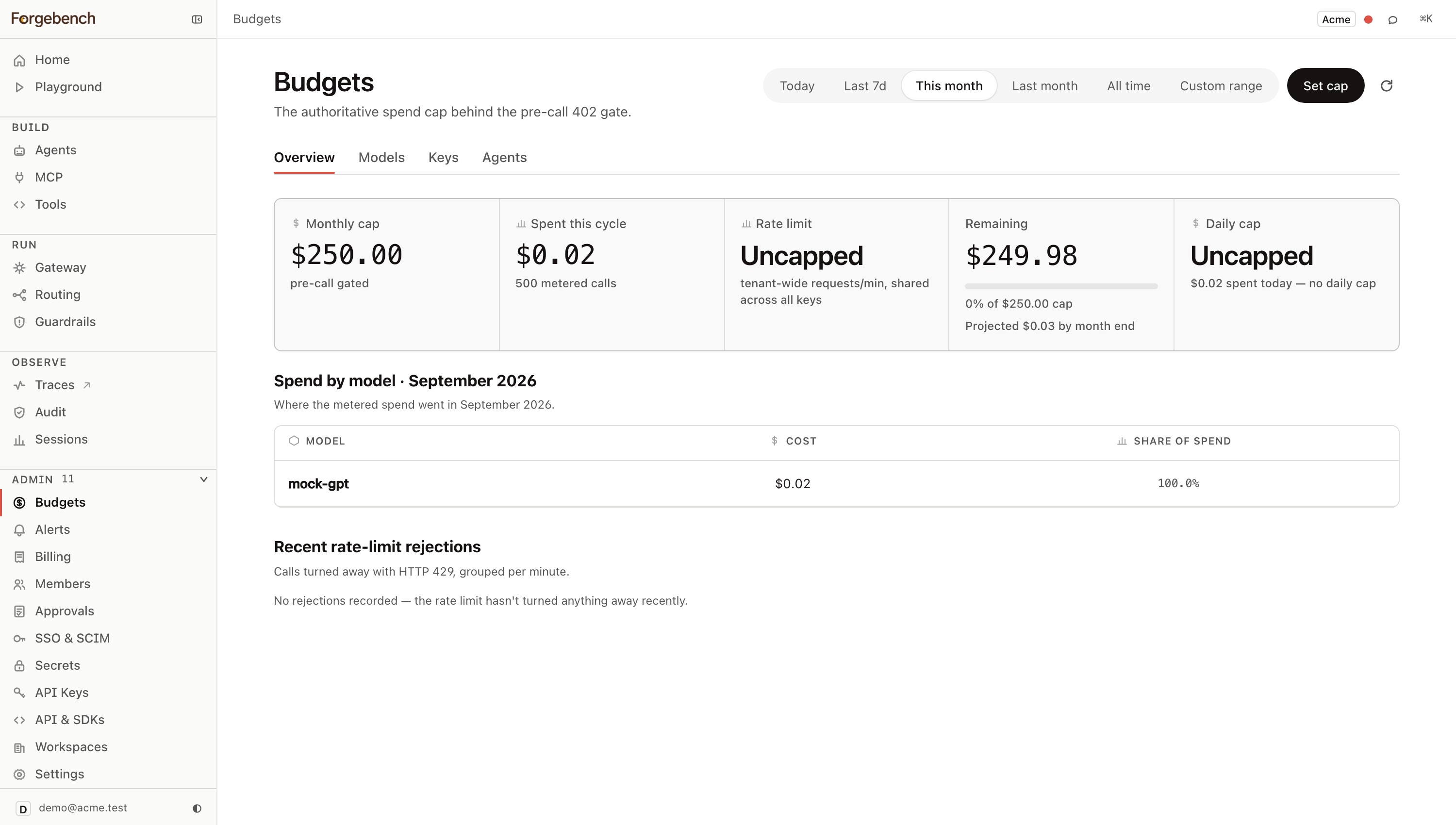
Set the workspace cap
The Overview tab holds the one cap every call is checked against, no matter which key, model or agent it comes from.
Click Set cap
Top-right of the Overview tab.
Set the monthly limit (USD)
The workspace-wide backstop. Takes effect on the next call.
Optionally set a daily limit (USD)
Resets every UTC day, independent of the monthly one. Leave it blank for no daily cap; the monthly one still applies.
Optionally set a rate limit (requests/min)
Protects request throughput rather than spend, shared across every developer key in the tenant. Leave it blank for no rate cap. A lower limit takes effect immediately, including against calls already made in the current minute.
Save caps
Applies on the next call, with no propagation delay to wait out.
Shared caps for a team's API keys, service keys and agent keys are covered in Budget pools.
Narrow it per model, key or agent
The tenant-wide cap above still applies regardless of what you set here: these are additional, opt-in ceilings, not replacements for it. Each lives on its own tab, but the pattern is the same: the thing itself (a key, an agent) is created elsewhere; its cap is edited here.
Per model (Models tab)
Click Add model cap, choose the model, and set a monthly and/or daily limit (USD), independent of each other and of the tenant-wide caps. Edit an existing one from its row's Edit button: the dialog title becomes
Edit cap: <model>.Per key (Keys tab)
Keys themselves are created on API Keys; this tab is the only place an existing key's cap is edited. Click Edit on its row and set a daily and/or monthly limit (USD). Leave either blank for no cap at that level.
Per agent (Agents tab)
Agents themselves are registered on Agents; this tab is the only place an existing agent's cap is edited. Click Edit on its row and set a monthly limit (USD); see Agents for the full walkthrough.
What a refusal looks like
Over the cap, the chokepoint returns 402 with a body that tells you enough to
act without opening the console:
{
  "detail": {
    "code": "budget_exceeded",
    "message": "monthly budget exceeded",
    "limit_usd": "0.000100",
    "spent_usd": "0.000385",
    "attempted_cost_usd": "0.005000"
  }
}
attempted_cost_usd is what the call would have cost. That is the field that
tells you whether you are looking at a cap set too low or a caller doing something
unreasonable; a single request attempting many times the remaining budget is a
different problem from a cap that needs raising.
Both SDKs raise this as a typed BudgetExceededError rather than a bare
status code. Handle it as a real operational state, not an exception to
swallow: degrade deliberately (queue it, fall back to a cheaper model, or
tell the user); retrying immediately just produces another refusal:
curl -X POST https://api.forgebench.ai/v1/chat/completions \
-H "Authorization: Bearer sk_..." \
-H "Content-Type: application/json" \
-d '{
  "model": "mock-gpt",
  "messages": [{"role": "user", "content": "hello"}]
}'
# 402 over budget: see the body shape above.
from forgebench import Forgebench, BudgetExceededError
client = Forgebench(api_key="sk_...", base_url="https://api.forgebench.ai")
messages = [{"role": "user", "content": "hello"}]
try:
resp = client.chat.completions.create(model="mock-gpt", messages=messages)
except BudgetExceededError as e:
log.warning("budget gate refused the call: %s", e)import { Forgebench, BudgetExceededError } from "@seedlinglabs/forgebench-sdk";
const forgebench = new Forgebench({ apiKey: "sk_...", baseUrl: "https://api.forgebench.ai" });
const messages = [{ role: "user" as const, content: "hello" }];
try {
const res = await forgebench.chat.create({ model: "mock-gpt", messages });
} catch (e) {
if (e instanceof BudgetExceededError) {
console.warn("budget gate refused the call", e.body);
} else {
throw e;
}
}Refusals are recorded
A refused call is not a dropped call. Each one is logged with its reason, so a burst of refusals is visible rather than silent. That log is the first place to look when an integration "stopped working" the day after someone tightened a cap; see Errors and refusals for what each reason means.
Alerts
Set thresholds on Alerts to hear about spend before the gate fires. Crossing a threshold notifies Slack or email; the alert fires from anywhere spend happens, including the Playground.
A threshold at 100% is not an alert, it is a post-mortem. Set the one you want to act on, usually somewhere you still have room to decide.