

Tracing your agent
Every model call that passes through Forgebench is traced automatically. Tracing your agent adds the part only your code knows: the agent itself, the functions it runs, the tools it calls. Mark those steps with the SDK and each run becomes one nested trace, with every model call placed under the step that made it, along with its tokens and cost.
support-agent  (agent)                         2.86s
├── classify_intent  (span)                    0.01s
├── gemini-flash-lite-latest  (generation)     0.85s   73 tok
├── get_weather  (tool)                        0.20s   input {"city": "sf"}  output {"temp": 18}
└── gemini-flash-lite-latest  (generation)     1.94s   96 tok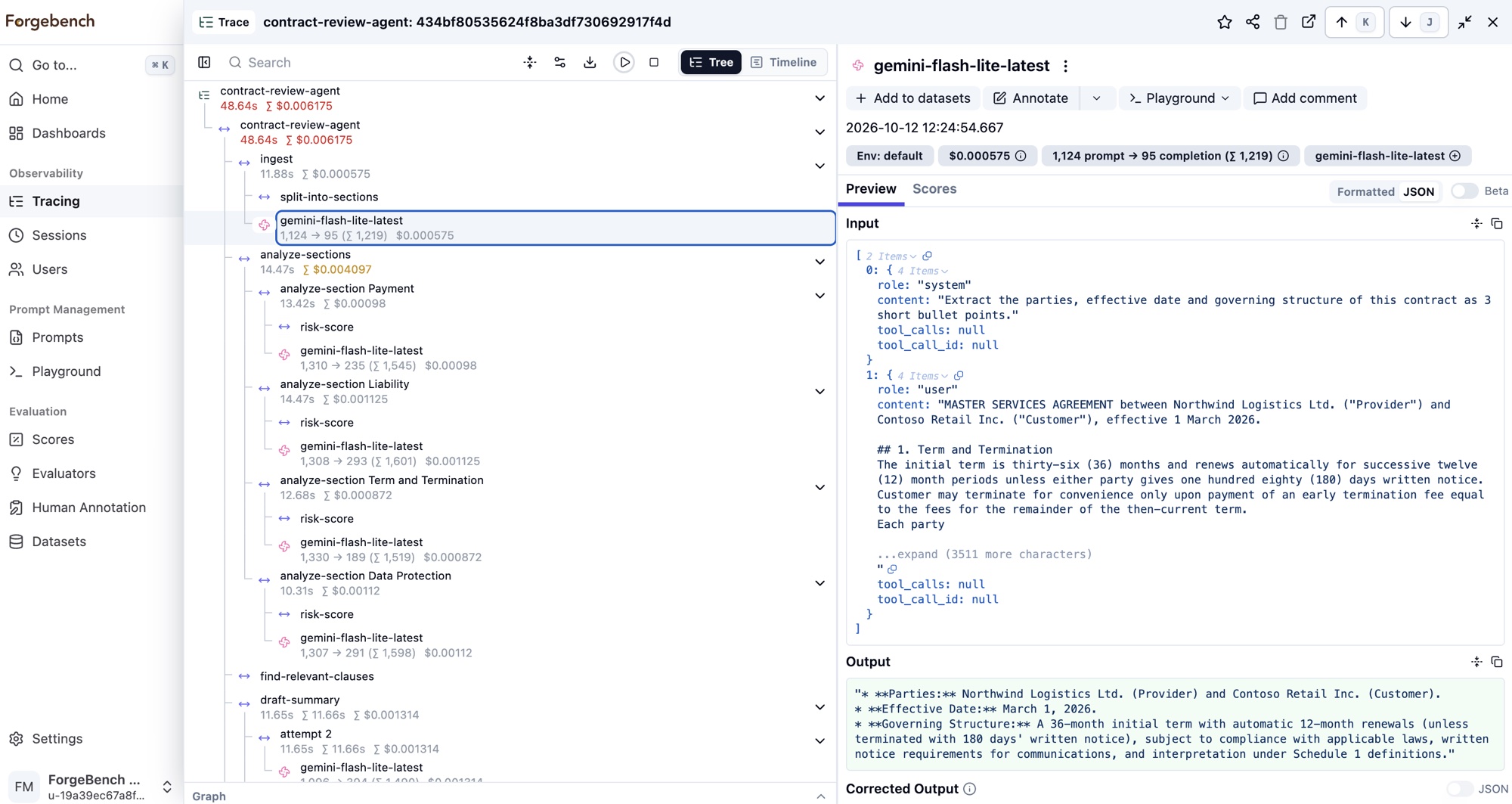
The steps are sent in the background with the same API key the agent already uses. There are no other keys to set up, nothing to install beyond the SDK, and nothing extra to grant the key. The SDK only ever writes traces; you read them in the console.
Quick start
Mark a function with observe and every call to it is recorded: its
arguments as input, its return value as output, how long it took, and an
error if it threw. Model calls made inside it nest under it on their own.
from forgebench import Forgebench, observe

fb = Forgebench()  # FORGEBENCH_API_KEY, FORGEBENCH_BASE_URL

@observe(as_type="tool")
def get_weather(city: str) -> dict:
  return {"city": city, "temp": 18}

@observe(as_type="agent", name="support-agent")
def run(question: str) -> str:
  fb.update_current_trace(user_id="customer-42", session_id="chat-7")
  weather = get_weather("sf")
  reply = fb.chat.completions.create(          # nests under "support-agent"
      model="gemini-flash-lite-latest",
      messages=[{"role": "user", "content": f"{question} Weather: {weather}"}],
  )
  return reply.choices[0].message.content

run("Should I take an umbrella?")
fb.flush()  # only in short scripts; long-running apps send in the background
import { Forgebench, observe, updateActiveTrace } from "@seedlinglabs/forgebench-sdk";
const forgebench = new Forgebench({ apiKey: process.env.FORGEBENCH_API_KEY! });
const getWeather = observe(async (city: string) => ({ city, temp: 18 }), {
name: "get_weather",
asType: "tool",
});
const run = observe(
async (question: string) => {
updateActiveTrace({ userId: "customer-42", sessionId: "chat-7" });
const weather = await getWeather("sf");
const reply = await forgebench.chat.create({ // nests under "support-agent"
model: "gemini-flash-lite-latest",
messages: [{ role: "user", content: `${question} Weather: ${JSON.stringify(weather)}` }],
});
return reply.choices[0]?.message.content;
},
{ name: "support-agent", asType: "agent" },
);
await run("Should I take an umbrella?");
await forgebench.flush(); // only in short scripts; long-running apps send in the backgroundimport ai.forgebench.ChatCompletionRequest;
import ai.forgebench.ChatMessage;
import ai.forgebench.Forgebench;
import ai.forgebench.tracing.Observation;
import ai.forgebench.tracing.ObservationType;
import ai.forgebench.tracing.TraceAttributes;
import ai.forgebench.tracing.Tracing;
import ai.forgebench.types.ChatCompletion;
import java.util.Map;
Forgebench client = Forgebench.builder().build(); // FORGEBENCH_API_KEY, FORGEBENCH_BASE_URL
Tracing tracing = client.tracing();
try (Observation agent = tracing.startActiveObservation(ObservationType.AGENT, "support-agent")) {
tracing.updateCurrentTrace(TraceAttributes.builder()
.userId("customer-42").sessionId("chat-7").build());
Map<String, Object> weather = tracing.observe(ObservationType.TOOL, "get_weather",
Map.of("city", "sf"), () -> Map.of("city", "sf", "temp", 18));
ChatCompletion reply = client.chat().completions().create(ChatCompletionRequest.builder()
.model("gemini-flash-lite-latest")
.addMessage(ChatMessage.user("Should I take an umbrella? Weather: " + weather))
.build()); // nests under "support-agent"
agent.output(reply.getContent());
} // the step ends here, even on an exception
client.flush(); // only in short programs; a JVM shutdown hook also flushesOpen the trace in the console: the run is the top row, get_weather and the
model call sit underneath it, and the trace carries the user and session you
set.
Steps and their types
Each step has a type, which decides how it is drawn and filtered. Names
are free text chosen by you: use whatever makes the trace easy to read, such
as retry 2 – fallback model or tool:send_email. The same name may appear
many times in one trace; every step has its own id.
| Type | Use it for |
|---|---|
span | Any unit of work. The default. |
agent | An agent's run, or one agent's turn in a multi-agent hand-off. |
tool | A tool or function the agent executed. |
chain | A sequence of steps passing data from one to the next, such as a plan. |
retriever | A lookup in a vector store, a search index or a database. |
embedding | Turning text into vectors. |
evaluator | A check that scores or grades an output. |
guardrail | A check that screens input or output before it is used. |
event | A single moment rather than a span of time. |
Marking a block of code
Not everything worth seeing is a whole function. A block form records any stretch of code as a step, and anything recorded inside it nests under it.
with fb.start_as_current_observation("plan", as_type="chain", input={"q": question}) as plan:
  steps = make_plan(question)
  plan.update(output={"steps": steps}, metadata={"planner": "v2"})
const steps = await forgebench.startActiveObservation(
"plan",
async (plan) => {
const steps = await makePlan(question);
plan.update({ output: { steps }, metadata: { planner: "v2" } });
return steps;
},
{ asType: "chain", input: { q: question } },
);try (Observation plan = tracing.startActiveObservation(ObservationType.CHAIN, "plan")) {
plan.input(Map.of("q", question));
List<String> steps = makePlan(question);
plan.output(Map.of("steps", steps)).metadata("planner", "v2");
}Patterns
Loops, retries and fallbacks
Give each attempt its own step. A failed attempt is recorded as an error and the next one appears beside it, so a trace shows exactly how a run recovered.
for attempt in (1, 2, 3):
    try:
        with fb.start_as_current_observation(f"attempt {attempt}") as step:
            return call_model(prompt)
    except TimeoutError:
        continue
Errors
An exception inside a step marks it ERROR with the exception's type and
message, and is raised again unchanged: tracing never swallows or changes an
error. To flag a step without failing it, set its level yourself, for
example update(level="WARNING", status_message="fell back to the small model")
(Python), update({ level: "WARNING", statusMessage: "..." }) (TypeScript)
or .level(ObservationLevel.WARNING).statusMessage("...") (Java).
Users and conversations
update_current_trace (Python), updateActiveTrace (TypeScript) and
updateCurrentTrace (Java) set fields on the whole trace:
| Field | What it does |
|---|---|
user_id / userId | Your end user. Shown on the trace and in the Users view. Model calls in the trace inherit it. |
session_id / sessionId | Groups the traces of one conversation into a session. Model calls in the trace inherit it. |
tags | Labels to filter on. Tags that look like Forgebench's own (tenant:, agent:, tool:…) are dropped. |
metadata | Your own key-value pairs. |
name | The trace's name. Defaults to the name of its top step. |
Parallel work
Steps that run at the same time each keep the right parent.
- Python:
asynciotasks need nothing. For a thread pool, wrap the function:pool.map(bind_context(work), items). - TypeScript:
Promise.alland other async code need nothing on Node 20.16 or later, Node 22 and Bun. Other runtimes nest code that runs one step at a time correctly. - Java: the current step belongs to the thread. Hand work to an executor
with
Tracing.wrap(task)(orTracing.wrapSupplierforCompletableFuture.supplyAsync). The async client does this for you.
Work that starts and ends in different places
A callback, a queue consumer or a background job can open a step in one
place and close it in another. start_observation (Python),
startObservation (TypeScript, Java) creates a step that does not become the
current one; call end() on it when the work is done. A step that is never
ended is never sent.
Continuing a trace
To add steps to a trace begun elsewhere (another process, or a later request for the same job), pass its id when starting the first step. A seed gives you a stable id from your own request or job id, so both sides arrive at the same trace without passing anything around:
trace_id = fb.create_trace_id(seed=job_id)          # same seed, same id
with fb.start_as_current_observation("resume", trace_id=trace_id):
    ...
In TypeScript await createTraceId(jobId) with
startActiveObservation(name, fn, { traceId }); in Java
Tracing.createTraceId(jobId) with
tracing.startActiveObservation(type, name, traceId).
Model calls inside a step
A chat call made through the SDK inside a step needs nothing extra. The SDK sends the trace's id and the step's id with the call, so the gateway records the model call in the same trace, as a child of that step, with the trace's user and session.
Two cases are deliberately not nested:
- a call given an explicit trace id of another trace keeps that trace;
- a call made by a different client (another API key, another workspace) never joins this client's trace or inherits its user.
Configuration
Tracing is on by default. Each setting can also come from an environment variable; a value that does not parse is ignored with a warning, so a typo never stops your agent from starting.
| Setting | Environment variable | Default | Meaning |
|---|---|---|---|
enabled | FORGEBENCH_TRACING_ENABLED | on | Off makes every tracing call do nothing. Model calls are still governed and still traced by the gateway. |
sample_rate | FORGEBENCH_SAMPLE_RATE | 1.0 | Share of traces kept, decided once per trace: a trace is sent whole or not at all. |
environment | FORGEBENCH_ENVIRONMENT | none | Stamped on every trace, for example production. |
release | FORGEBENCH_RELEASE | none | Your app's version, stamped on every trace. |
mask | — | none | A function run on every input, output, metadata value and error message before it leaves your process. |
flush_at / flush_interval | — | 50 / 1 s | A batch is sent once this many steps are waiting, or this long after the first one. |
max_queue_size | — | 10,000 | Beyond this many waiting steps, the oldest are dropped with a warning. |
import json

from forgebench import Forgebench, TracingConfig

def mask(data):
  # Runs on every value (a string, or JSON-shaped data) before it is sent.
  return json.loads(json.dumps(data).replace("4111-1111-1111-1111", "****"))

fb = Forgebench(tracing=TracingConfig(sample_rate=0.2, environment="production", mask=mask))
const forgebench = new Forgebench({
apiKey: process.env.FORGEBENCH_API_KEY!,
tracing: {
sampleRate: 0.2,
environment: "production",
// Runs on every value (a string, or JSON-shaped data) before it is sent.
mask: (data) => JSON.parse(JSON.stringify(data).replace("4111-1111-1111-1111", "****")),
},
});import ai.forgebench.Forgebench;
import ai.forgebench.tracing.TracingConfig;
import com.fasterxml.jackson.core.JsonProcessingException;
import com.fasterxml.jackson.databind.ObjectMapper;
import com.fasterxml.jackson.databind.node.TextNode;
ObjectMapper json = new ObjectMapper();
Forgebench client = Forgebench.builder()
.tracing(TracingConfig.builder()
.sampleRate(0.2)
.environment("production")
// Runs on every value (as a JsonNode) before it is sent.
.mask(data -> {
try {
return json.readTree(data.toString().replace("4111-1111-1111-1111", "****"));
} catch (JsonProcessingException e) {
return TextNode.valueOf("[masked]");
}
})
.build())
.build();Names follow each language: sampleRate, flushIntervalMs and so on in
TypeScript, and the same names on TracingConfig.builder() in Java, where
mask works on Jackson's JsonNode.
What gets sent, and what stays
- Inputs and outputs are captured when they are set and serialised to
JSON. Values that cannot be represented become a short description;
anything over 64,000 characters is cut, with a
…[truncated]marker. - Turn capture off for a function whose arguments or result should never
leave:
@observe(capture_input=False, capture_output=False)(Python),{ captureInput: false, captureOutput: false }(TypeScript), or simply do not pass the value (Java). maskruns before anything leaves your process, including error messages, which often carry exactly the values you want to hide.- On the server, steps go through the same redaction as model calls: credential-shaped strings are always removed, and personal data is removed too when a PII policy is on for the workspace or the agent. With a PII policy on, long text values are also shortened to 4,000 characters in the trace.
- The agent, key and workspace on each step are set by Forgebench from the API key, never from what the SDK sends, so a trace's attribution cannot be forged.
Short-lived programs
Steps are sent from the background every second or so. A long-running
service never has to think about it. A script, a CLI or a serverless
function should send what is left before it exits: fb.flush() (Python),
await forgebench.flush() (TypeScript), client.flush() (Java). Closing the
client also sends what is left. As a safety net, Python and the JVM flush when
the process exits, and Node when its event loop runs empty; Node does not get
that chance on an explicit process.exit(), so flush first.
One client per API key
Create one client and reuse it: each client runs its own background sender.
An application that talks to several workspaces (one client per API key)
should mark its functions with the client-bound form, client.observe(...)
(Python, TypeScript) or client.tracing() (Java). While clients for more than
one key are open, the module-level observe does not guess between them: it
runs the function untraced and warns once. Closing clients you no longer use
makes it work again as soon as only one key is left.
What Forgebench does with the steps
The SDK posts finished steps to POST /v1/observations/batch, at most 100
per request. Forgebench replies straight away and stores them in the
background; tracing can never slow down or fail your agent, and a send that
fails is logged and dropped.
A step can be refused on its own, while the rest of its batch is kept. The SDK logs each reason once:
| Reason | Meaning |
|---|---|
trace_not_owned | The trace was started by another agent or key. Each trace belongs to whoever sent its first step, whatever way its id is spelled. |
type_reserved | The step used the generation type, which only the gateway records. |
unknown_type | The type is not one of those listed above. |
invalid_time | The step ends before it starts, or falls outside the years 2000–2100. A time without an offset is read as UTC. |
invalid_parent | The step names itself as its parent, or its parents form a loop. |
invalid | The step is malformed, for example a bad id. |